After describing settlement options (here) and Instant Payment flow between two TIPS participants (here) it’s time to explore the Instant Payment between two Reachable Parties.
This is the purpose of this article.
The messages used in this scenario are the same as for the Instant Payment flow between two TIPS participants:
- FItoFICustomerCreditTransfer (pacs.008.001.08) sent:
- to TIPS to instruct the Instant Payment transaction
- by TIPS to inform the Beneficiary Participant about the transaction received
- FIToFIPaymentStatusReport (pacs.002.001.10) sent:
- to TIPS to either accept or reject the Instant Payment transaction
- by TIPS to inform the actors about the result of the settlement
The scenario I am going to present is built on the following assumptions:
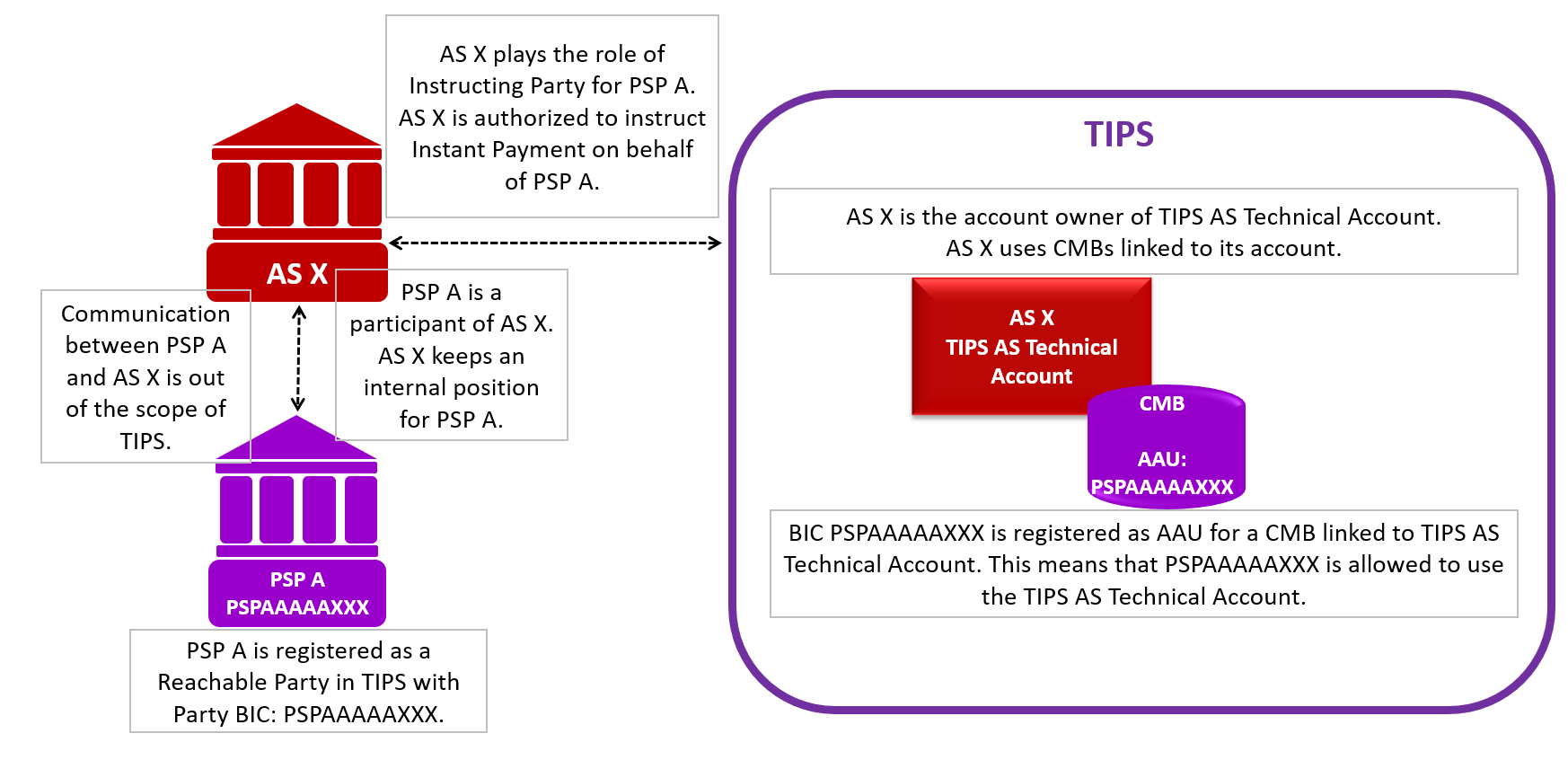
- sending Reachability Party settles via TIPS AS Technical Account
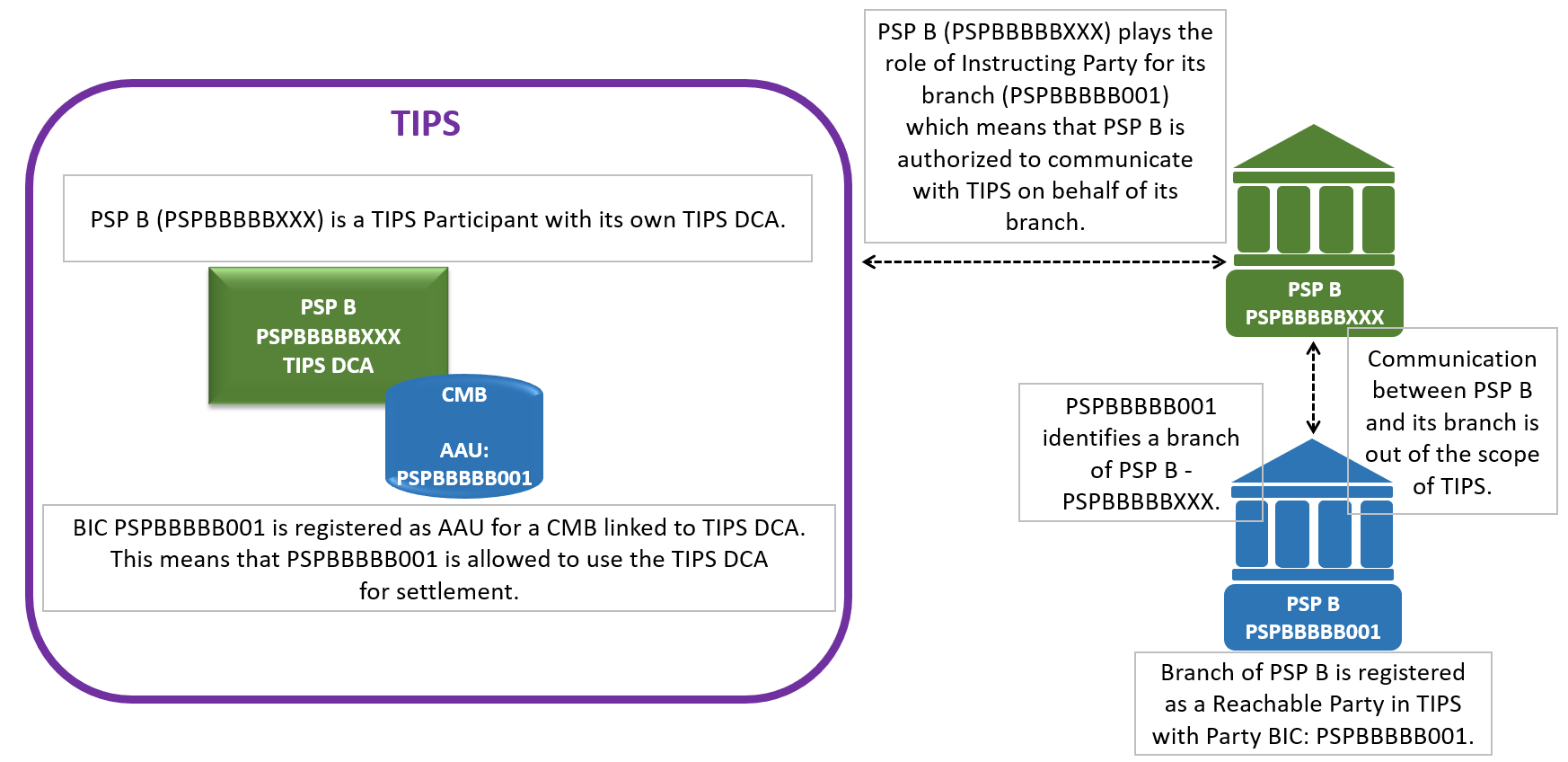
- receiving Reachability Party settles via TIPS DCA
- both on the sending and the receiving side CMBs are used
- no floor or ceiling notification are expected
To understand this scenario it is crucial to have a closer look at the static data of the involved parties.
For the sending side, the general set-up of reference data in TIPS can be presented in the following way:
For the receiving side, we can depict the reference data set-up this way:
Just to remind ourselves, an Authorised Account User (AAU) specifies a BIC that is allowed to use the related account or CMB for settlement.
Below is the diagram with the basic scenario of a successful payment between two Reachable Parties described above: PSPAAAAAXXX and PSPBBBBB001.
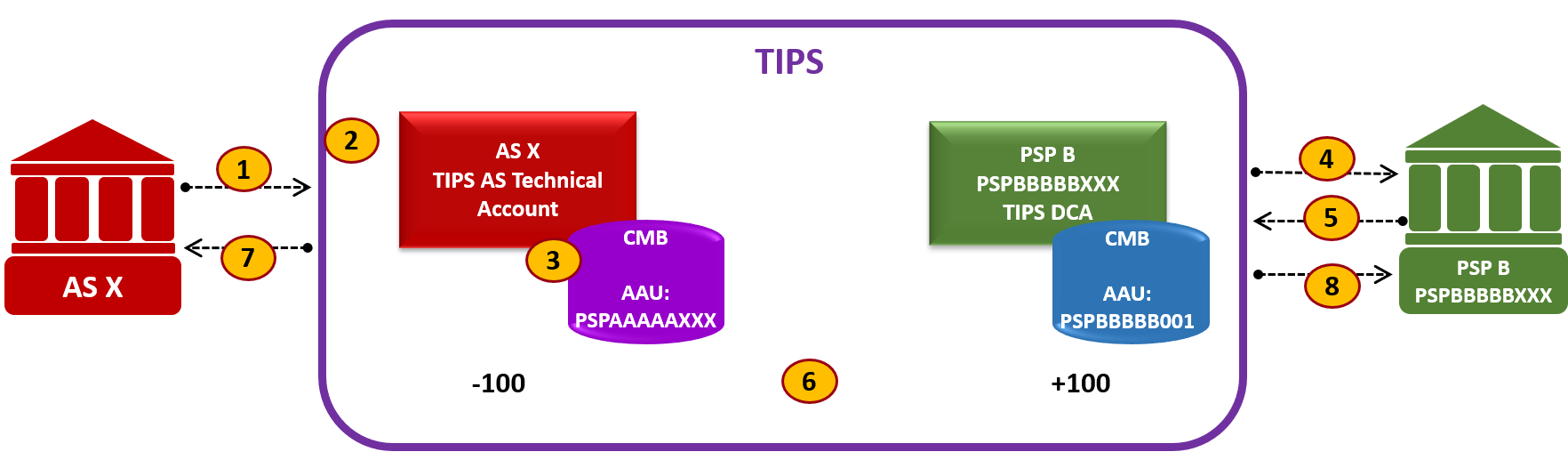
The first thing to notice in the diagram is that I have not presented PSP A nor Branch of PSP B. This is because I decided to show only the flows in which TIPS is directly involved. Since PSP A and Branch of PSP B use the functionality of Instructing Party, they do not interact with TIPS directly. Actors defined as Instructing Parties act on their behalf.
This authorization is kept in “DN-BIC Routing” table, where DN is linked to specific BIC.
Below there is description of the main points from the diagram.
To make the description more precise I added information about possible statuses for Instant Payment transaction.
Generally, in TIPS:
- there are three intermediary statuses: Received, Validated, Reserved
- there are three final unsuccessful statuses: Failed, Expired, Rejected
- there is one final successful status: Settled
This is the description of a positive scenario, however, I also added some information related to unsuccessful paths (marked in red).
(1) Payment transaction (pacs.008)
AS X sends an SCT Inst payment transaction to TIPS.
This pacs.008 is sent on behalf of PSP A.
Please find here the example of such a message: pacs.008 between two reachable parties
The message contains the following elements:
Debtor Agent BIC: PSPAAAAAXXX
Creditor Agent BIC: PSPBBBBB001
Please bear in mind that according to the SEPA Instant Credit Transfer Rulebook:
- Debtor Agent BIC in pacs.008 is defined as the BIC code of the Originator PSP. Following this definition Debtor Agent BIC is called in TIPS: Originator BIC.
- Creditor Agent BIC in pacs.008 is defined as the BIC code of the Beneficiary PSP. Following this definition Creditor Agent BIC is called in TIPS: Beneficiary BIC
An Instant Payment transaction entering the system for the first time is temporarily in Received status while it undergoes the TIPS validations.
(2) TIPS validates the transaction
First TIPS validates the incoming message.
Below I presented the most important, in my view, tasks performed by TIPS.
TIPS checks whether AS X is authorized to send an Instant Payment on behalf of PSP A. In other words, the Distinguished Name of the Sender must be authorised to instruct for the “Originator BIC”. For this TIPS checks the existence of the couple (Sender, Debtor Agent) in the “Inbound DN-BIC Routing” table. The DN of the Sender is kept in TIPS “Originator DN”.
In our example, DN of AS X is authorized to instruct on behalf on PSP A.
For “Beneficiary BIC” TIPS checks that a unique item related to the Creditor Agent exists in the entity “Outbound DN-BIC Routing” table. This item will be used later on to forward Instant payment to PSP B.
In our example, the DN of PSP B is linked to PSPBBBBB001.
TIPS checks whether the Originator timeout already expired.
In our example, timeout is not exceeded.
TIPS checks whether the transaction is not a duplicate.
In our example, it is not a duplicate.
TIPS checks whether Debtor Agent is linked as AAU to either account in TIPS or CMB. Similarly, TIPS checks whether Creditor Agent is linked as AAU to either account in TIPS or CMB.
In our example:
- PSPAAAAAXXX is an Account Authorised BIC for CMB linked to TIPS AS Technical Account
- PSPBBBBB001 is an Account Authorised BIC for CMB linked to TIPS DCA
Additionally, TIPS infers the accounts to be debited and credited from the BICs defined as AAUs:
- TIPS check for which account/CMB “Originator BIC” is defined as authorised user. The selected account is kept in TIPS as “Originator Account” and the possible CMB as “Debiting CMB”.
In our example, PSPAAAAAXXX is the AAU for CMB (“Debiting CMB”) linked to TIPS AS Technical Account held by AS X (“Originator Account”). - TIPS check for which account/CMB “Beneficiary BIC” is defined as authorised user. The selected account is referred to as “Beneficiary Account” and the possible CMB as “Crediting CMB”.
In our example, PSPBBBBB001 is the AAU for CMB (“Crediting CMB”) linked to TIPS DCA held by PSP B (“Beneficiary Account”).
As we have seen, our Instant Payment transaction passes all validations successfully and becomes Validated.
Unsuccessful scenarios:
If the Instant Payment transaction did not pass one of the validation checks pacs.002 would be sent to AS X (DN of the Sender) containing the proper error code.
Unsuccessful validation may set the transaction status to:
- Expired (if Originator timeout expired) or
- Failed (any other possible error)
(3) TIPS reserves the relevant amount
At this point, the next step of the process begins with the attempt to reserve the required cash amount on the relevant debit account.
Bear in mind, that payments are always settled for the full amount; partial settlement is not foreseen in TIPS.
During this step the system retrieves the available balance of the “Originator account” and the “Debiting CMB” headroom (if CMB is used).
The system checks that the Settlement amount is lower than or equal to the “Originator account” available balance.
If a “Debiting CMB” is additionally involved, the system checks that the Settlement amount is lower than or equal to CMB headroom.
If sufficient funds are available in the relevant account and the Instant Payment transaction would not exceed the current headroom of the CMB to be debited, TIPS:
- reserves the amount on the “Originator account”*
- if a “Debiting CMB” is involved, the system decreases its headroom by the same amount.
*While the cash amount is reserved, it cannot be used for settlement in a different payment or liquidity transfer. This already makes the available liquidity on the account decreased as if the account was debited. As a result, during the settlement phase that happens later on in the process, the available liquidity won’t be changed. Only reserved amount will be decreased.
In our example, the amount on TIPS AS Technical Account and CMB headroom are sufficient.
TIPS:
- reserves funds in the TIPS AS Technical account of AS X.
- decreases the CMB headroom
The transaction is set to Reserved status.
After this moment, the settlement attempt is agreed and can either be confirmed or rejected by the counterpart or fail for a missing answer. A Reserved Instant Payment transaction may subsequently change its status into one of the four final statuses, depending on the outcome of the next steps.
Unsuccessful scenario:
If for any reason the reservation is unsuccessful (e.g. because either the cash balance on the account is insufficient or the account is blocked) its status changes to Failed.
Pacs.002 would be sent to AS X (DN of the Sender) containing the proper error code.
(4) TIPS forwards the transaction (pacs.008) to PSP B
After the reservation of funds, TIPS forwards the payment transaction for acceptance to the receiving participant.
The DN to which TIPS sends the message is identified in the “Outbound DN-BIC Routing” table from the element Creditor Agent in pacs.008. A unique item related to the Creditor Agent must exist in the “Outbound DN-BIC” table. Identified DN is referred to in TIPS as “Beneficiary DN”.
In our example, PSP B is an Instructing Party for its Branch, so TIPS forwards the received Instant Payment transaction to DN of PSP B.
(5) PSP B replies with pacs.002
PSP B shall respond to TIPS with a beneficiary reply, either confirming or rejecting the payment.
In our example, PSP B (PSPBBBBBXXX) acting on behalf of its branch (PSPBBBBB001) sends a payment status report (pacs.002) with a positive status – ACCP.
TIPS checks whether PSP B is authorised to send an Instant Payment on behalf of its branch. For this, the system checks the existence of the couple (Sender, Creditor Agent) in the entity “Inbound DN-BIC Routing” table.
In our example, PSP B is authorised to send messages on behalf of its branch.
TIPS checks whether Beneficiary Timeout is exceeded.
In our example, it is not exceeded.
After that, TIPS checks that pending original transaction exists.
TIPS identifies the transaction from the Original Transaction ID. The transaction must be in status Reserved.
In our example, transaction exists and TIPS and TIPS is ready to perform settlement.
Here, several unsuccessful scenarios may occur:
- If TIPS does not receive a reply from the Beneficiary Participant within a standard, configurable timeout period, the Instant Payment times out and the transaction moves to status Expired.
- If the Beneficiary Participant rejects the Instant Payment, the transaction moves to status Rejected.
- If the Beneficiary Participant confirms or rejects the Instant Payment but any kind of error occurs, the transaction moves to status Failed
(6) Settlement process
If the Beneficiary Participant confirms the Instant Payment and TIPS settles it successfully, the transaction moves to status Settled.
During the settlement:
- The reserved amount of the “Originator Account” is decreased by the amount of the corresponding settled transaction.
- The same positive amount is added to the “Beneficiary Account” (We can say that reserved amount on “Originator Account” is moved to available amount on “Beneficiary Account”)
- If a “Crediting CMB” is involved, TIPS increases its headroom by the same amount.
In our example:
On the debit side:
- Reserved funds on the TIPS AS Technical Account are decreased with the settlement amount
On the credit side:
- PSP B’s TIPS DCA is credited with the settlement amount
- Crediting CMB’s headroom is increased by the same amount.
The transaction status is turned into Settled. This makes the payment irrevocable.
Unsuccessful scenarios:
When payment is moved to one of the unsuccessful statuses:
- Expired – missing Beneficiary confirmation
- Rejected – Beneficiary Participant rejects the payment
- Failed – Beneficiary Participant confirms but error happens
then:
- the reserved amount in the “Originator Account” is automatically released and can be once again used for settlement. This increases the available liquidity on the account,
- “Debiting CMB” headroom is increased by the same amount.
Depending on the scenario, TIPS sends a negative status report to the Originator and Beneficiary Participants.
(7) TIPS confirms settlement to the AS X (pacs.002)
TIPS confirms settlement to the AS X by forwarding the received pacs.002 to the AS X (“Originator DN”).
Once received the Payment status report, AS X updates the internal position of PSP A.
AS X reports to PSP A that the SCT Inst Transaction has been executed.
Unsuccessful scenarios:
When a payment is moved to one of the unsuccessful statuses (Expired, Rejected, Failed) TIPS sends a negative status report to Originator Participants.
(8) TIPS confirms settlement to the PSP B (pacs.002)
TIPS generates a positive Payment status report and sends it to PSP B (“Beneficiary DN”).
PSP B reports to its branch that the SCT Inst Transaction has been executed.
Unsuccessful scenarios:
When payment is moved to one of the unsuccessful statuses (Expired, Failed) TIPS sends a negative status report to Beneficiary Participant.