TIPS uses a so-called deposit model of IP processing.
This means that payments can be settled only if there is enough liquidity on the account to be debited.
Because of that, liquidity management features in TIPS are crucial for the seamless processing of Instant Payments.
There are three basic rules related to Liquidity Transfers (LTs) in TIPS:
- they can only be performed between accounts that are denominated in the same currency,
- they do not entail a reservation of funds (unlike Instant Payment transactions),
- are settled or rejected immediately.
Ways to trigger Liquidity Transfers
Liquidity Transfers may be initiated in TIPS in:
- Application-to-Application mode (A2A) using the xml message or
- User-to-Application mode (U2A) through a Graphic User Interface (GUI).
In this article I am going to focus on A2A mode.
Below I describe the messages used for LT processing.
Messages used for LT processing
- Liquidity Credit Transfer (camt.050)
In A2A mode camt.050 (Liquidity Credit Transfer) is used to initiate LT.
In different scenarios (described further in this article) camt.050 can be sent to TIPS by TIPS Participant, Ancillary System, Instructing Party or RTGS system.
The description of the camt.050 message is available in TIPS User Detailed Functional Specifications (TIPS UDFS).
TIPS UDFS can be found on ECB website under TIPS Documentation -> Technical/functional/legal documents.
In chapter 3.3.2.2.10 LiquidityCreditTransfer (camt.050.001.05) there are two tables presenting message elements:
- Table 125 Outbound and intra-service LiquidityCreditTransfer (camt.050.001.05)
- Table 126 Inbound and Outbound Pull LiquidityCreditTransfer (camt.050.001.05) – RTGS interaction scenarios
Full description of camt.050 is available in My Standards (link is also in the above chapter in TIPS UDFS).
Below, in the section “LT from TIPS DCA to TIPS AS Technical Account“ I provide you with the sample camt.050 message.
The answer for camt.050 is camt.025 (Receipt).
- Settlement/rejection confirmation (camt.025)
Camt.025 (Receipt) is sent by TIPS to the originator of the Liquidity Transfer to confirm/reject the execution of a Liquidity Transfer.
- Debit/Credit confirmation (camt.054)
As part of TIPS functionality related to liquidity management, TIPS Account owner may be informed when the account is credited/debited.
The notification is sent out only if previously configured by the account owner.
TIPS sends a BankToCustomerDebitCreditNotification (camt.054) to the owner of the debited/credited account to report the settlement of the Liquidity Transfer.
Debit/credit notification is often used by participants for automated reconciliation in their internal systems.
What kind of Liquidity Transfers are possible in TIPS?
As we know from the previous article, there are two main kinds of accounts in TIPS:
- TIPS DCA
- TIPS AS Technical Account*
* TIPS AS Technical Account is used by ACH to collect the liquidity set aside by its participants for funding their positions. From the legal perspective funds on the TIPS AS Technical Account are owned by PSPs and not Ancillary System.
The functionality related to Liquidity Transfers for each of the above account types differs.
What is a differentiating factor?
In short:
- TIPS DCA can receive the liquidity from the RTGS system connected to TIPS (Inbound LT) and send liquidity to this RTGS system (Outbound LT).
- TIPS AS Technical Accounts cannot be used neither in Inbound nor Outbound Liquidity Transfer processing. TIPS AS Technical Account can receive liquidity only internally from TIPS DCA, and send liquidity only internally to TIPS DCA.
Let’s have now a closer look at the types of Liquidity Transfers possible in TIPS.
Liquidity Transfers between TIPS and RTGS system (inter-service LT)
As TIPS is currency-agnostic by design it is open to be connected with many RTGS systems settling in different currencies.
One of the functionalities covered by TIPS connection to a particular RTGS system is to allow the funding and defunding of TIPS DCAs in a particular currency vis-à-vis RTGS System accounts.
These Liquidity Transfers go via so-called Transit Accounts.
Transit Accounts are technical accounts involved in the Liquidity Transfer process. They cannot be involved in the settlement of Instant Payment transactions.
Only one Transit Account per settlement currency exists in TIPS. The Transit Account for euro belongs to the European Central Bank.
Each individual Liquidity Transfer is comprised of at least two separate transactions where one transaction takes place in the RTGS (between RTGS Account and TIPS Transit Account) and the other in TIPS (between TIPS DCA and RTGS Transit Account). Both transactions (in whichever direction) are executed automatically in sequential order. This is possible because the RTGS system and TIPS are technically connected, which enables automated interaction.
In the context of TIPS connection to RTGS system, there are two LTs possible:
- Inbound (from RTGS System to TIPS)
- Outbound (from TIPS to an RTGS System)
The terms Inbound and Outbound are defined from TIPS perspective.
As in my articles I am going to focus on euro settlement, I will describe mainly the connection of TIPS to T2.
Inbound Liquidity Transfer
An Inbound Liquidity Transfer moves liquidity from an RTGS System account to a TIPS DCA.
Inbound Liquidity Transfer orders can be triggered only in the RTGS System and are received by TIPS. They cannot be triggered in TIPS, because TIPS does not provide a functionality to pull liquidity from the relevant RTGS System.
After the settlement of an Inbound Liquidity Transfer, TIPS informs the RTGS System and, optionally, the owner of the TIPS DCA about the successful settlement.
Let’s have a look at the example of Inbound Liquidity transfer from CLM to TIPS.
If you are not familiar with TARGET architecture and do not know what CLM is, you can check this article: TARGET Services Infrastructure.
Below is the diagram presenting Inbound LT from CLM to TIPS.
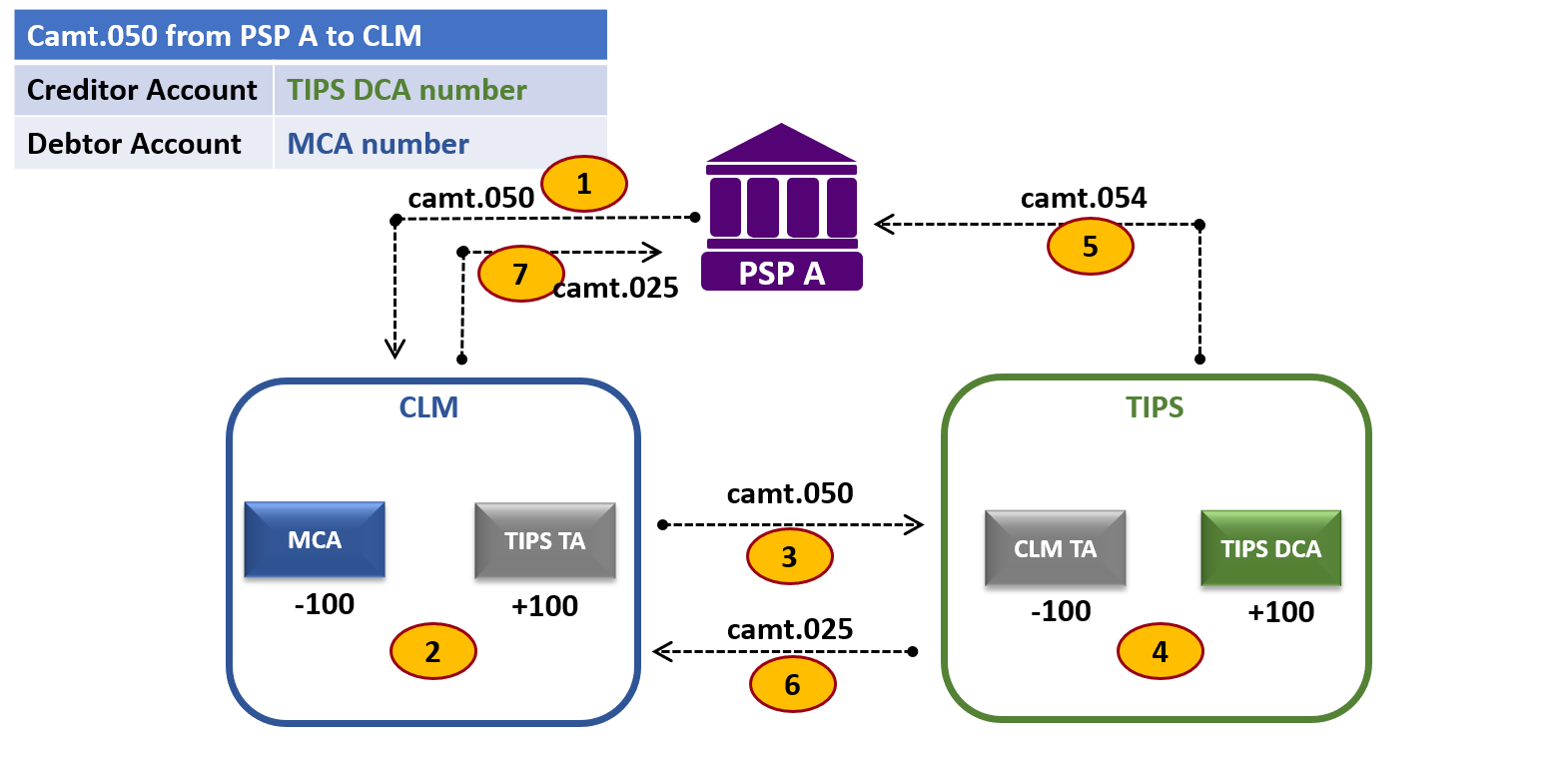
In our example PSP A is both MCA holder and TIPS DCA holder. Please bear in mind, that this does not need to be the case.
Below are the steps of an Inbound LT from CLM to TIPS:
(1) camt.050 is sent by PSP A to CLM
(2) in CLM: MCA of PSP A is debited and Transit Account dedicated for TIPS is credited
(3) camt.050 is forwarded to TIPS
(4) in TIPS: Transit Account dedicated for CLM is debited and TIPS DCA of PSP A is credited
(5) camt.054 is optionally sent to PSP A
(6) camt.025 is sent by TIPS to CLM
(7) camt.025 is sent by CLM to PSP A
The above example decribed the LT from CLM to TIPS.
But, you may ask:
Is it possible to send funds directly to TIPS from other than MCA accounts in TARGET Services?
Yes, in terms of LTs in euro, it is possible to transfer liquidity from an account in CLM, RTGS or T2S to any TIPS DCA.
However, from a technical viewpoint, these types of transfers will always be intermediated by the CLM (will go via the relevant Transit Accounts in CLM).
Here is an example.
This is a diagram of an Inbound LT from RTGS to TIPS.

Below are the steps of an Inbound LT from RTGS to TIPS:
(1) camt.050 is sent by PSP A to RTGS
(2) in RTGS: RTGS DCA of PSP A is debited and Transit Account dedicated for CLM is credited
(3) camt.050 is forwarded by RTGS to CLM
(4) in CLM: Transit Account dedicated for RTGS is debited and Transit Account dedicated for TIPS is credited
(5) camt.050 is forwarded by CLM to TIPS
(6) in TIPS: Transit Account dedicated for CLM is debited and TIPS DCA of PSP A is credited
(7) camt.054 is optionally sent by TIPS to PSP A
(8) camt.025 is sent by TIPS to CLM
(9) camt.025 is forwarded by CLM to RTGS
(10) camt.025 is sent by RTGS to PSP A
A few things to notice here:
- We can see that funds are transferred via several Transit Accounts. These accounts, however, are not present in the camt.050 that PSP A sends to RTGS.
- There are no direct Transit Accounts between RTGS and TIPS, so LTs between RTGS and TIPS always go via CLM. However, MCA that PSP A holds in CLM is not involved.
- The accounts listed in camt.050 are only RTGS DCA (account to be debited) and TIPS DCA (account to be credited).
- In our example, PSP A is the holder of both RTGS DCA and TIPS DCA. It may be, however, that RTGS DCA holder that instructs LT in RTGS is a different institution than TIPS DCA holder that receives LT.
Outbound Liquidity Transfer
An Outbound Liquidity Transfer is used to repatriate liquidity from a TIPS DCA to the relevant RTGS System.
Outbound Liquidity Transfer orders can be triggered in TIPS and are received by the relevant RTGS System.
These LT orders may be sent by:
- a Participant or
- an Instructing Party acting on behalf of the Participant
If the Liquidity Transfer request passes all the business checks successfully, TIPS transfers the requested amount from the TIPS DCA to the relevant RTGS System. TIPS then expects the RTGS System to reply with either a confirmation or a rejection message.
If the RTGS System sends a negative reply, funds are automatically reversed to the TIPS DCA.
Similarly to the Inbound LT, in the Outbound LT it is possible to transfer liquidity from any TIPS DCA to any MCA.
The logic of messages involved and bookings done is similar to the Inbound LT, that was presented in the diagram above.
Is it possible to send funds directly from TIPS to other than MCA accounts in TARGET Services?
Yes, in terms of LTs in euro, it is possible to transfer liquidity from any TIPS DCA to an account in CLM, RTGS or T2S. However, from a technical viewpoint, these types of transfers will always be intermediated by the CLM component (via the relevant Transit Account in CLM). Here, the same principle applies as described above for Inbound LT.
Pull functionality
If the corresponding RTGS System supports pull functionality, Outbound Liquidity Transfer orders could also be triggered in the RTGS System.
In the context of CLM for example, it is possible to use LT in pull mode to transfer liquidity from a TIPS DCA to an MCA.
This pull LT is instructed in CLM by the TIPS DCA holder and is only available in user-to-application (U2A) mode.
Liquidity transfers inside TIPS (intra-service LT)
There is also a possibility of processing so-called intra-service LTs in TIPS.
An Intra-service Liquidity Transfer moves liquidity from a TIPS DCA to a TIPS AS Technical Account (or vice versa).
This type of liquidity transfer is used to fund/defund a TIPS AS Technical Account to allow an Ancillary System to process Instant Payments transactions in TIPS.
LT from TIPS DCA to TIPS AS Technical Account
LT from TIPS DCA to TIPS AS Technical Account can be triggered by:
- TIPS Participant,
- Ancillary System* or
- Instructing Party acting on behalf of the TIPS Participant.
*If Ancillary Systems is allowed to send the LT from the TIPS DCA on behalf of the PSP.
Please keep in mind that this transfer of liquidity may be done by the TIPS Participant on behalf of Reachable Party previously authorised to settle on the TIPS AS Technical Account. In such a case Reachable Party will be present in Creditor BIC element in camt.050, to allow Ancillary System to identify the party on whose behalf the funds were provided.
Below is the diagram presenting such LT:

In our scenario:
PSP A (PSPAAAAAXXX) is a TIPS participant with its own TIPS DCA (numer: IDEEURPSPAAAAAXXX00001*).
ACH C is an Ancilliary System that holds a TIPS AS Technical Account (numer: AFREURACHCCCCCXXX00002*)
PSP B (PSPBBBBBXXX) is a Reachable Party linked to the above TIPS AS Technical Account.
*The accounts numbering notation is explained further in this artice.
These are the main steps of such LT:
(1) PSP B wants to fund its position in ACH C.
PSP B does not hold its own TIPS DCA.
It sends request for funding to PSP A that is a TIPS DCA holder.
The interaction between PSP B and PSP A is out of scope of TIPS.
(2) PSP A sends camt.050 to TIPS on behalf of PSP B.
The message contains the BIC of the PSP on whose behalf the LT is performed (Creditor BIC).
camt.050 message elements:
- Creditor: PSPBBBBBXXX (PSP whose position has to be funded)
- Creditor Account: AFREURACHCCCCCXXX00002
- Debtor: PSPAAAAAXXX
- Debtor Account: IDEEURPSPAAAAAXXX00001
(3) in TIPS: PSP A’s TIPS DCA is debited and ACH C’s TIPS AS Technical Account is credited.
(4) camt.025 is sent by TIPS to PSP A to notify of the status of LT (“settled”).
(5a) Optionally, TIPS sends a debit notification (camt.054) to PSP A.
(5b) Optionally, TIPS sends a credit notification (camt.054) to ACH C in order to report the settlement of the liquidity transfer.
Camt.054 contains the PSPBBBBBXXX as a Creditor BIC.
(6) in ACH C: Based on Creditor BIC in camt.054, ACH C debits the TIPS mirror account that it holds in its books and increase the position of PSP B.
Further interaction between ACH C and PSP B is out of scope of TIPS.
Here is the example camt.050 from PSP A to TIPS following this scenario: camt.050 from PSP A to TIPS
LT from TIPS AS Technical Account to TIPS DCA
LT from TIPS AS Technical Account to TIPS DCA can be triggered by:
- Ancillary System or
- an Instructing Party acting on behalf of the Ancillary System.
LT from TIPS AS Technical Account to TIPS DCA works in a simiar way as the LT in other direction, which I described above.
Let’s include in this example the same Parties.
These are the main steps of such LT:
(1) PSP B wants to defund its position in ACH C. It sends request for defunding to ACH C (the interaction between PSP B and ACH C is out of scope of TIPS).
(2) ACH C sends camt.050 to TIPS.
(3) in TIPS: TIPS AS Technical Account is debited and TIPS DCA is credited.
(4) camt.025 is sent by TIPS to ACH C to notify of the status of LT (“settled”).
(5a) Optionally, TIPS sends a debit notification (camt.054) to ACH C.
(5b) Optionally, TIPS sends a credit notification (camt.054) to PSP A.
(6) in ACH C: Based on camt.025/camt.054, ACH C debits the position of PSP B and credits TIPS mirror account.
Liquidity transfers that are NOT possible in TIPS:
The following LTs are NOT possible in TIPS:
- Inbound LT crediting TIPS AS technical account
- Outbound LT debiting TIPS AS technical account
- Intra-service liquidity transfers between two TIPS DCAs
- Intra-service liquidity transfers between two TIPS AS Technical Accounts
How are the accounts identified?
For LTs, accounts in TARGET are identified by account numbers, not BICs.
Authorised Account User (AAU) feature I introduced in my previous article (TIPS Parties & Accounts) is not used when it comes to LT.
What is the numbering convention?
As we have already seen, account numbering does not follow IBAN structure.
General account notation is provided in the document TARGET SERVICES REGISTRATION AND ONBOARDING GUIDE and is as follows:
I CB EUR PartyBIC11 free text (max 34 char).
where:
- I identifies TIPS DCA account type (A identifies TIPS AS technical account)
- CB is a country code
- EUR is a Currency code
- Party BIC11
- 17 character free text
If a Party has more than one TIPS DCA, the account numbers are distinguished in the free text section
(BIC in the acount number is a Party BIC, so it will be the same for all the acounts held by the same Party).
When is the execution of LTs possible?
TIPS operates on a 24/7/365 basis.
- Intra-service LT
Intra-service LTs (between TIPS DCAs and TIPS AS Technical Accounts) are possible continuously during the day, on a 24/7/365 basis.
If so, Intra-service LTs are available on weekends.
- Inter-Service Liquidity Transfer
The main difference between Intra-service and Inter-service LTs is that Inter-service LTs are only available during the opening hours of the RTGS.
It means that, for example, funding of TIPS DCA in euro is not possible on weekends as CLM is not working then.
Therefore, TIPS Participants have to take into consideration their liquidity needs for the hours during which T2 will be closed.
Moreover, even on TARGET business days, there are some limitations which are listed below.
Inter-service liquidity transfers to/from TIPS are not available:
• from 18:00 until 19:30 for CLM/RTGS on all TARGET business days
• from 17:45 until 20:00 for T2S on all TARGET business days, and
• during the maintenance window.
Standing order LT
Up till now I described so-called Immediate LTs.
These are LT to be executed at the moment of generation.
However, in TARGET there is also a possibility to set-up Standing order LT.
These are LTs configured in CRDM and triggered automatically every business day at certain business day events.
These should be regarded as recurring/regular transfers of a fixed amount.
Floor / ceiling notification via camt.004
As part of TIPS functionality related to liquidity management, TIPS Account owner may be informed if its balance exceeds the configured threshold.
This notification is generated for the account owner only if the ceiling/floor threshold is configured for a particular account.
It is sent by TIPS as ReturnAccount message (camt.004).
Depending on the scenario this message may be sent by TIPS to notify:
- the owner of the credited account that the ceiling threshold is exceeded after the successful Instant Payment transaction or Liquidity Transfer
- the owner of the debited account that the floor threshold is exceeded after the successful Instant Payment transaction or Liquidity Transfer
Additionally, in the future there may be another way floor/ceiling thresholds can be used for liquidity management.
What I have in mind is the so-called Rule-based LT.
Such Rule-based LT exists already between CLM and RTGS.
The processing of these LTs is triggered automatically by the system upon breach of a pre-defined limit (floor/ceiling) on a particular account.
Rule-based LT will be usable in TIPS as from the implementation of TIPS-0028-URD – Rule-based liquidity transfer orders between MCA and TIPS DCA.
This concludes the article.
In the next one, we will have a closer look at Credit Memorandum Balances.